





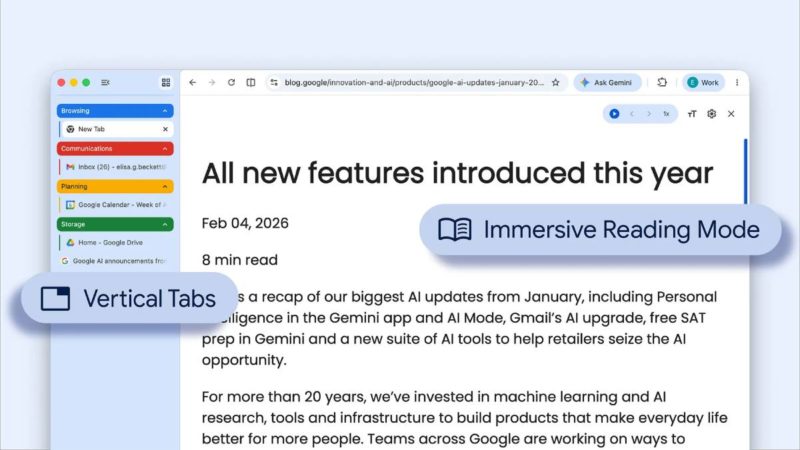
Google 為 Chrome 瀏覽器推出 2 項全新功能,包括以垂直方式顯示分頁、閱讀模式升級,簡化使用體驗並創造生產力。
使用者已能依照個人偏好,選擇在 Chrome 中使用「垂直分頁」,只需要在任一 Chrome 視窗按下右鍵,並選擇「以垂直方式顯示分頁」。將分頁移至 Chrome 側邊後,就能完整閱讀頁面標題,輕鬆管理分頁群組,即使分頁過多也不成問題。這種版面特別適合多工處理,並確保不遺漏任何一個分頁。
垂直分頁並非瀏覽器方面新的概念,最初的 Chrome 團隊曾經測試過,但認為分頁「相當於視窗的標題列」,垂直分頁有別於原有使用的邏輯和設計,直至今日團隊才把垂直分頁的想法實現。
Too many @GoogleChrome tabs open? Try vertical tabs, rolling out now.
Just right-click any Chrome window and select “Show Tabs Vertically” to move your tabs to the side of the browser window, making it easier to read page titles and manage tab groups. pic.twitter.com/DO7ShWl89f
— Google (@Google) April 7, 2026
▲ Chrome 能以垂直方式顯示分頁。
深受使用者喜愛、用於專注閱讀的「閱讀模式」也獲得升級,有了全新全頁介面。只需要在任一網頁按下右鍵並選擇「在閱讀模式中開啟」,就能將繁雜的網頁轉換成以文字為主,移除視覺干擾。
We’re also introducing immersive reading mode, a new full-page interface for deep focus. Right-click on any page and select “Open in Reading Mode” to remove visual distractions so you can focus on the text. pic.twitter.com/bs25wapafl
— Google (@Google) April 7, 2026
▲ Chrome 閱讀模式升級。
(首圖來源:Google Blog)




 科技新報粉絲團
 加入好友
加入好友
 訂閱免費電子報


