





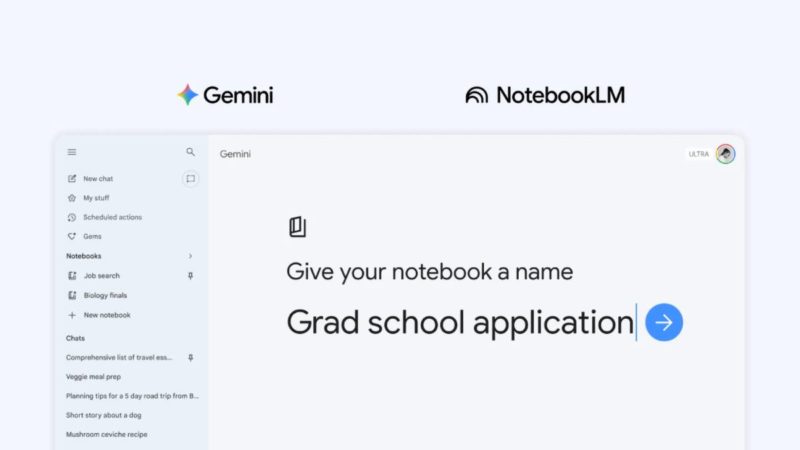
Google 去年底將 NotebookLM 加入、成為 Gemini 應用程式的資料來源之一。現在 Gemini 進一步新推出「筆記本」(notebook)功能,深化雙方產品整合。
筆記本功能在 Gemini 提供一個專屬空間,讓用戶整理 AI 對話與檔案,尤其將同一主題的對話集中管理。只需要在 Gemini 選單中點擊「新增筆記本」(Add to notebook)即可,並將過去的對話移至指定筆記本,還能加入相關檔案(如文件、PDF 等),提供更多上下文脈絡。
當你將精選資料整理到筆記本,Gemini 能以自身作為強大工具結合這些內容和網路搜尋,提供更具針對性與實用性的回應。
由於筆記本會在 Gemini 與 NotebookLM 之間同步,在任一端新增的資料都會同步出現在另一端,就能善用 2 款應用程式的特色功能。Google 以學生為例,可將課堂筆記加入筆記本,並在 NotebookLM 生成一段影片摘要;隔天打開 Gemini,要求 Gemini 根據同樣內容撰寫一份報告草稿。
Google 表示,可把筆記本想像成一個跨越 Google 產品的個人知識庫,並從 Gemini 開始。
Last year, we integrated into the @GeminiApp by allowing you to upload your notebooks as sources. Now, we’re taking our relationship to the next level 🏠 ♥️
Starting today, you can now:
— Access all of your personal, unshared notebooks directly inside the Gemini App
— Use your… pic.twitter.com/uidvuUj7uA— NotebookLM (@NotebookLM) April 8, 2026
▲ Gemini 加入筆記本功能。
筆記本功能從本週起在 Gemini 應用程式推出,優先提供給付費訂閱 Google AI Ultra、Google AI Pro 及 Google AI Plus 的網頁版用戶,未來數週將擴展至行動裝置、歐洲更多地區、以及 Gemini 免費版用戶。
(首圖來源:Google Blog)




 科技新報粉絲團
 加入好友
加入好友
 訂閱免費電子報


